
Free Timesheet Template: Weekly and Monthly (Excel + PDF)

by All Gravy Last updated:

This free timesheet template is an Excel file with a weekly and a monthly timesheet. It puts the planned shift next to the actual clock-in and clock-out, takes off the break and works out hours, the difference to plan, overtime and estimated pay. Pink cells flag a break that’s too short or too little rest between shifts. There’s a printable PDF for anyone who still signs in on paper.
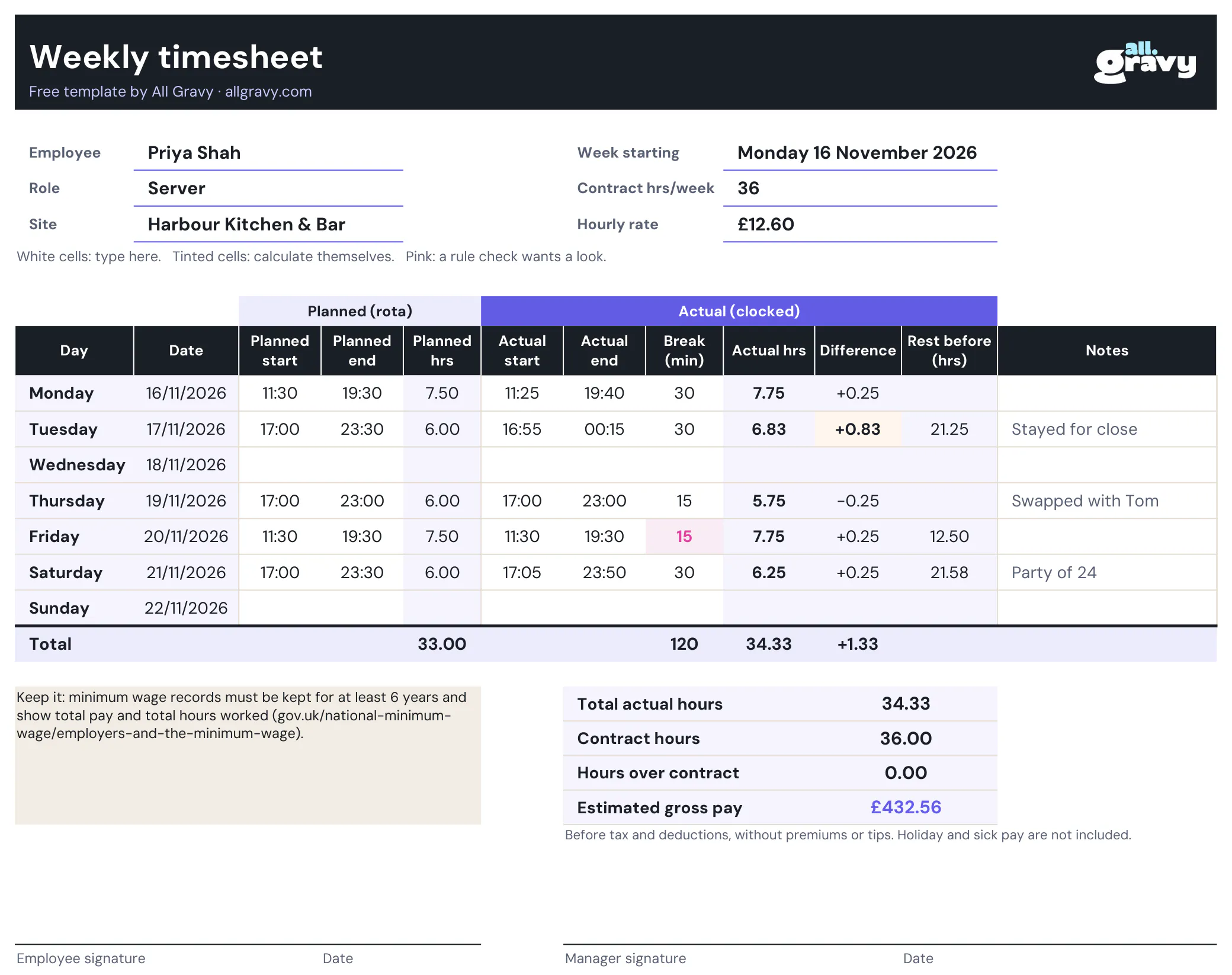
What’s in the timesheet template
- Weekly timesheet. Monday to Sunday, dates filled in from the week start.
- Monthly timesheet. Enter the first of the month and get every day of that month, for staff paid monthly.
- Planned vs actual. Planned start and end from the rota on the left, the clocked times on the right.
- Breaks in minutes. Hours worked take off the break actually taken, so a skipped break shows up.
- Totals that add up themselves. Hours worked, difference to plan, hours over contract and estimated gross pay.
- Rest check. The hours between the last finish and the next start, flagged pink below the minimum you set.
- Sign-off. Employee and manager signature lines, so it’s agreed before it goes to payroll.
- Notes. Stayed for close, swapped with Tom, sent home early: the reason, written down on the day.
How to fill in a weekly timesheet
- Fill in the header. Employee, role, site and the Monday the week starts. The dates fill themselves.
- Copy the planned shifts. Take them from the rota. If you use our staff rota template, the planned hours match: both use the same break rule.
- Enter actual times. Clock-in and clock-out as 17:05 and 23:50, and the break taken in minutes.
- Check the colours. Yellow means actual and planned differ by 30 minutes or more. Pink means the break or the rest was below the rule.
- Sign it off. Employee and manager sign and date it, then it goes to payroll.
For staff paid monthly, use the Monthly timesheet tab in the same file. It works the same way, one row per day.
Planned vs actual hours: why both
Actual hours are what you pay. Planned hours next to them tell you why the number is what it is. One server running 20 minutes over every close is a rota problem, not a timekeeping one: the close is planned too short. A timesheet that only shows actual hours hides that.
Using the template as a clock in sheet
Not every site has a clock-in system. Print the PDF, give each person a sheet for the week and keep the sheets by the staff entrance or the till, so people write their times in as they arrive and leave. Type it into the Excel version at the end of the week to get the totals. Handwritten times plus a manager’s signature are a lot easier to check than memory on payday.
Breaks, rest and records in the UK
The checks in the template follow the numbers on its Settings tab. Out of the box they’re set to a 30-minute break policy and the UK legal rest rule:
- Rest break. Adults working more than 6 hours are entitled to one uninterrupted 20-minute break (gov.uk). Many contracts give more: set your own in Settings.
- Daily rest. 11 hours between working days (gov.uk).
- Records. Minimum wage records must be kept for at least 6 years and show total pay and total hours worked, including absences and overtime (gov.uk). Keep signed timesheets with your payroll records.
The estimated pay is hours times the hourly rate, before tax and deductions. It leaves out premiums, tips, holiday pay and sick pay, so treat it as a check, not a payslip.
Tips for timesheets that don’t cause arguments
- Fill it in on the day. Friday-afternoon timesheets written from memory are where the missing 15 minutes come from.
- Agree a rounding rule and write it down. To the minute, or to the nearest 5 or 15 minutes, the same for everyone.
- Write down the why. A short note on a long shift saves a long conversation on payday.
- Compare against the rota every week. The same shift running long three weeks in a row means the rota is wrong. Our guide on how to make a staff rota covers planning shifts to real demand.
When paper timesheets stop scaling at 5+ sites
One manager, one site, one stack of timesheets works. At five sites it’s a weekly chase: missing sheets, unreadable times, hours typed into payroll by hand and nobody sure which version is final.
All Gravy Scheduling takes that out, with time and attendance built in. It’s launching now, as a new AI-powered evolution of our scheduling product:
- No more chasing sheets. Staff clock in and out on site from the app they already use.
- Planned and actual side by side. Managers see where a shift ran long and approve the hours before anything reaches payroll.
- Payroll gets clean hours. Approved hours go to payroll, and every change stays traceable.
- Sick days sorted quickly. Cover is found fast and the hours are counted correctly.
Comparing tools first? Our roundup of employee attendance apps lays out the options. Or book a demo and see it with your own sites.
Frequently asked questions
Is the timesheet template free?
Yes. The Excel file and the printable PDF download straight from the page. No email and no sign-up.
Does the timesheet calculate hours automatically?
Yes. Enter start and end times and the break in minutes, and it works out the hours worked, the difference to the planned shift, hours over contract and estimated gross pay. Shifts past midnight count correctly.
Should a timesheet show planned and actual hours?
It helps. Actual hours are what you pay. Planned hours next to them show where shifts run long, where people leave early and where the rota itself is wrong, before it adds up on payroll.
How long do I need to keep timesheets in the UK?
Minimum wage records must be kept for at least 6 years and show total pay and total hours worked. Timesheets are often part of that record. Source: gov.uk, employers and the minimum wage.
Is there a monthly timesheet version?
Yes. The file has a Weekly timesheet tab and a Monthly timesheet tab. Enter the first day of the month and the dates fill in for that month, 28 to 31 days.
Can staff use it as a clock in sheet?
Yes. Print one PDF sheet per person, keep the sheets by the till or the staff entrance, then type them up at the end of the week. Across several sites a clock-in app saves the typing and the chasing.