
Free Staff Rota Template for Excel and Google Sheets

by All Gravy Last updated:

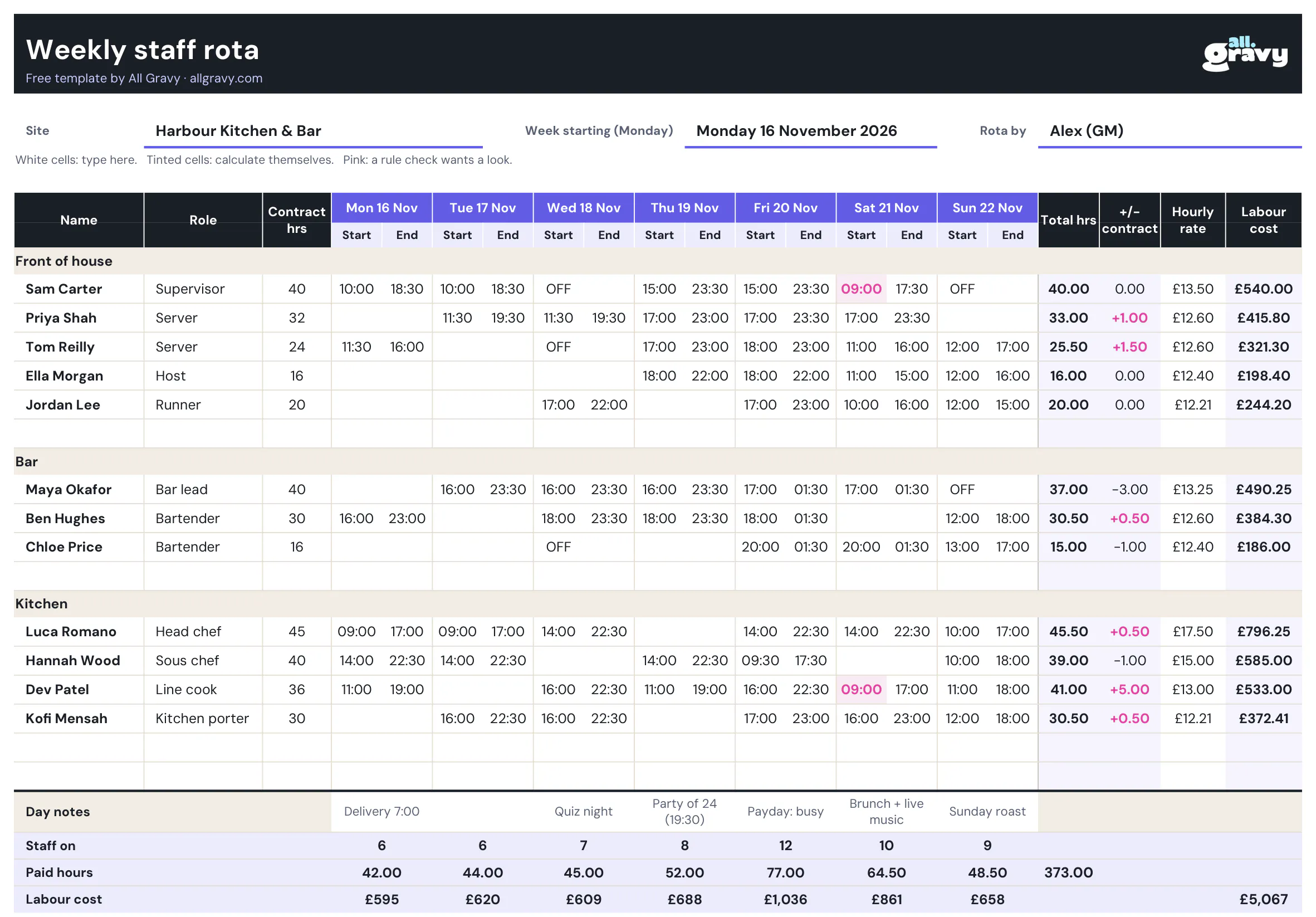
This free staff rota template gives you a weekly rota in Excel that does the maths for you: paid hours per person, hours against contract, labour cost per day and a pink flag when someone gets less rest than they should. Download it, type in your team and you have this week’s rota in ten minutes. There’s a printable PDF for the back-of-house wall too, and a monthly rota template if you plan the whole month at once.
What’s in the free staff rota template
The file is built for hospitality: split shifts, late closes and part-time contracts are the norm, not the exception.
- A weekly rota by section. Front of house, bar and kitchen, with room for 16 people. Rename the sections to match your venue.
- Start and end times that do the maths. Type 17:00 and 01:30 and it knows the shift runs past midnight.
- Paid hours per person. Shift length minus the unpaid break from the Settings tab, added up for the week.
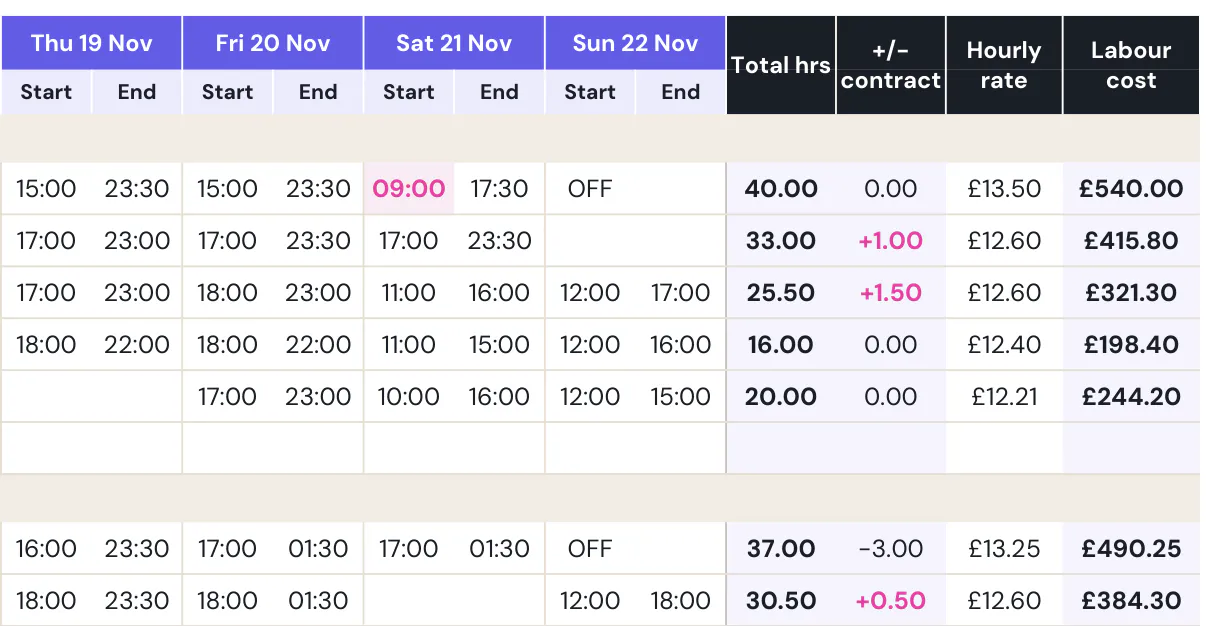
- Hours against contract. Over-contract hours show in pink, so you spot the person quietly drifting to 50 hours.
- Labour cost per person and per day. Add an hourly rate and the bottom rows show what each day costs you.
- Rest and weekly hours checks. A shift that starts less than 11 hours after the last one finished turns pink, and so does a week above 48 hours.
- Day notes. Deliveries, a party of 24, quiz night: the things that change how a shift feels.
- A printable PDF. The blank rota fits one landscape A4 page.
How to create a rota with the template
- Set the week. Type your site and the Monday the week starts. The dates across the top fill themselves.
- Add your team. Put each person under their section with their role, contract hours and hourly rate. Leave rate empty if you don’t want labour cost.
- Enter shifts. Start and end as 09:00 and 17:30. Leave days off empty, or type OFF, HOL or SICK. Text counts as zero hours.
- Check the flags. Pink start times mean too little rest since the last shift. Pink totals mean someone is over the weekly limit you set.
- Check the bottom rows. Staff on, paid hours and labour cost per day. If Friday costs twice Tuesday but takes twice the covers, fine. If not, move a shift.
- Publish it. Print the rota tab, or post a photo where everyone sees it.
For the full process, from forecasting covers to handling swaps, read our guide on how to make a staff rota.
Set your break rule once
The Settings tab holds the rules the sheet works with. By default it deducts a 30-minute unpaid break from shifts over 6 hours, checks for 11 hours rest and flags weeks over 48 hours. Change them to your own policy: the formulas and checks follow.
Rota template in Excel or a printed rota
Use the Excel version if you want the totals and checks, and print it when it’s final. Use the PDF if you plan on paper first or need a blank rota for the staff room wall. Both have the same layout, so a handwritten draft types straight across.
Many managers keep a “standard week” copy with the usual shifts filled in, then copy the tab each week and only change what’s different. It’s the fastest way to make a weekly rota in a spreadsheet.
Monthly rota template
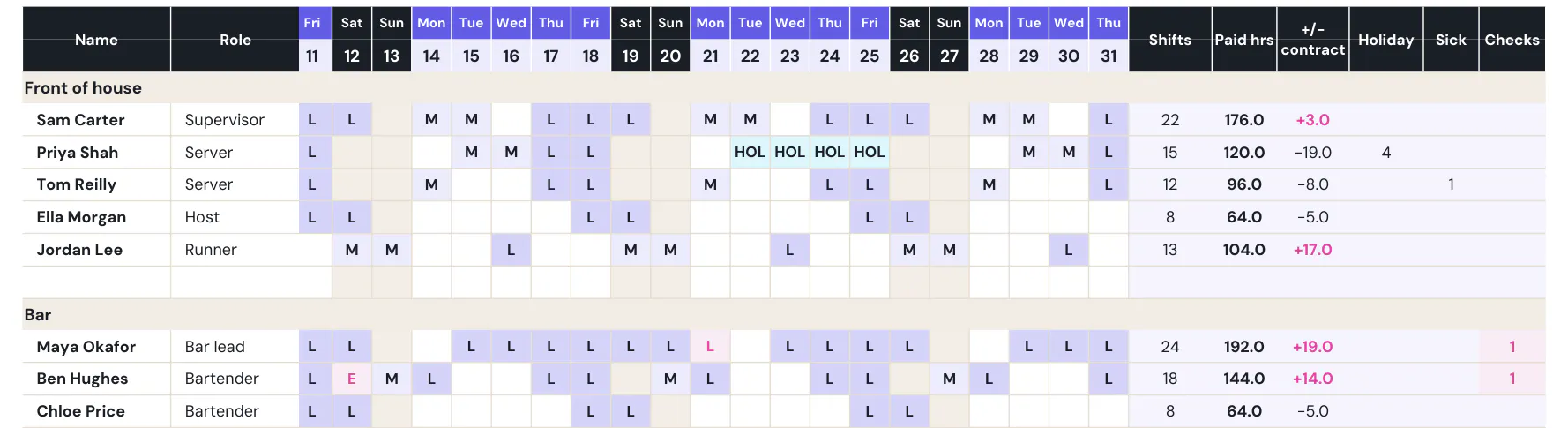
Planning the whole month at once? The free monthly rota template puts your team down the side and days 1 to 31 across the top. Type one shift code per person per day and it counts shifts, paid hours against monthly contract, holiday and sick days. Set the month and the weekdays and weekends line up by themselves.
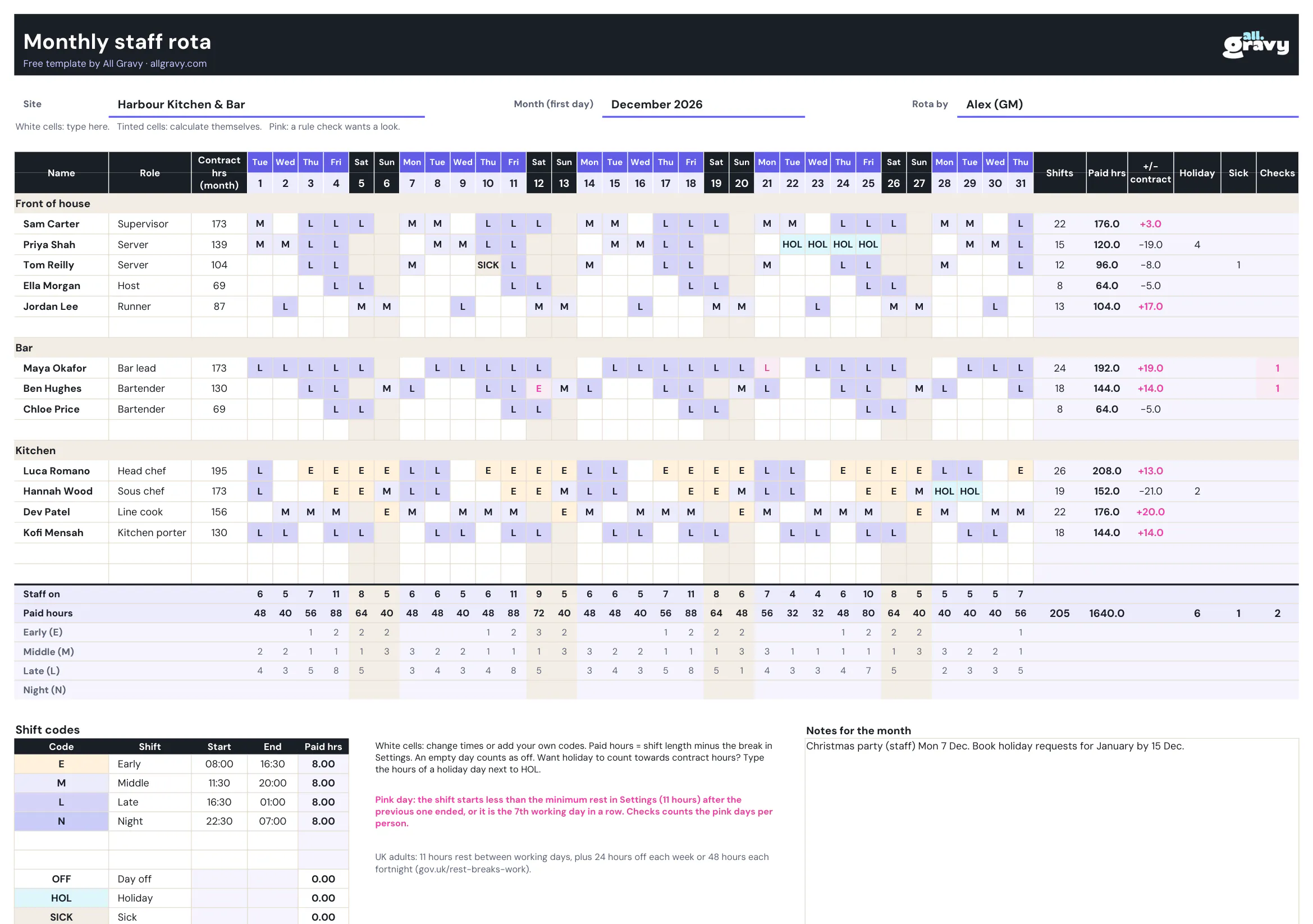
- Shift codes you control. E, M, L and N for early, middle, late and night with your own times, plus OFF, HOL and SICK. Add your own codes in the table under the rota.
- Monthly hours against contract. Paid hours per person for the month, with over-contract hours in pink.
- Cover per day. The bottom rows count staff on, paid hours and how many earlies, middles and lates each day has.
- Rest checks from codes. A late followed by an early, with less than 11 hours in between, turns pink. So does a 7th working day in a row.
- One page to print. The blank PDF has days 1 to 31 on one landscape A4 page, ready for the staff room wall.
Weekly or monthly rota?
Use the monthly rota when shifts follow a steady pattern and you want holiday and cover for the whole month in one view. Use the weekly rota when start and finish times change from shift to shift, or when you need labour cost per day. Plenty of managers use both: the month for the big picture, the week for the detail.
UK rules your weekly rota has to respect
The template checks rest and weekly hours against the numbers in Settings. These are the legal minimums for adult workers in the UK:
| Rule | Minimum | Source |
|---|---|---|
| Rest break | 20 minutes uninterrupted when working more than 6 hours | gov.uk: rest breaks at work |
| Daily rest | 11 hours between working days | gov.uk: rest breaks at work |
| Weekly rest | 24 hours each week, or 48 hours each fortnight | gov.uk: rest breaks at work |
| Weekly hours | 48 hours on average (normally over 17 weeks), unless the worker opts out | gov.uk: maximum weekly working hours |
Under-18s get longer breaks and more rest, and in most cases can’t work nights. See gov.uk: young workers before you rota a Saturday job student on a late close. Contracts can give more than the legal minimum: if yours do, set those numbers in Settings.
Tips for a weekly rota people stick to
- Publish early. A week ahead at minimum, two if you can. Swaps get sorted before the week starts, not at 4pm on the day.
- Plan to demand, not to habit. Look at last month’s covers per day and service. A rota copied from last week copies its mistakes too.
- Keep the strongest people on the busiest shifts. Pair new starters with them, not with each other.
- Make swaps visible. A swap agreed in a group chat and not on the rota is how two people turn up and nobody closes. Our guide to shift swapping rules has a sample policy to copy.
- Plan holiday next to the rota. Our free staff holiday planner template shows who’s off and flags clashes before you build the week.
- Track hours, not just shifts. The same rota every week can still push someone over contract once breaks and late finishes add up. Pair the rota with our free timesheet template to compare planned and actual hours.
When the spreadsheet stops scaling at 5+ sites
A rota spreadsheet works well for one site with one manager. At five sites it’s five files, five versions of the truth and a lot of re-typing. Swaps happen in WhatsApp, sick calls happen by phone, and someone types the hours into payroll by hand at the end of the month.
That’s where All Gravy Scheduling comes in. It’s launching now, as a new AI-powered evolution of our scheduling product:
- Rotas built faster, and checked. Start from your usual week and see a rule break while you plan, not on payday.
- One rota your team actually sees. Shifts, swaps and holiday live in the app your team already opens for chat and training.
- Labour cost before you publish. Know what the week costs per site while you can still change it.
- Hours approved before payroll. What people worked is checked by a manager before anyone gets paid.
Our Hospitality Retention Benchmark 2026 found that the tools staff open every day are the ones that move retention, and the schedule is one of the things they open them for. To compare tools, start with our roundup of the best rota apps, or book a demo to see All Gravy with your own rota.
Frequently asked questions
Is the staff rota template really free?
Yes. Download the Excel file and the printable PDF straight from the page. No email, no sign-up. Use it for as many sites and weeks as you like.
Does the rota template work in Google Sheets?
Yes. In Google Sheets go to File, Import, upload the .xlsx and the formulas, colours and checks come with it. It also opens in Excel and LibreOffice.
How does the template calculate hours?
Each shift is end time minus start time, minus the unpaid break set on the Settings tab (30 minutes for shifts over 6 hours by default). Shifts that run past midnight count correctly, so 18:00 to 02:00 is 8 hours before the break.
What rest rules does a UK rota have to follow?
Adult workers are entitled to a 20-minute break when they work more than 6 hours, 11 hours rest between working days and 24 hours off each week (or 48 hours each fortnight). Average weekly hours are capped at 48 unless the worker opts out. Under-18s have stricter rules. Source: gov.uk.
Is there a monthly rota template?
Yes. The free monthly rota template shows days 1 to 31 for each person. Type a shift code per day and it counts shifts, paid hours against monthly contract, holiday and sick days, and flags short rest and a 7th working day in a row. It comes as Excel and as a blank one-page PDF to print.
Can I use the template for more than one site?
Yes: save one copy per site and per week. Past three or four sites the copies get hard to keep in sync, because swaps, sick calls and hours for payroll all happen outside the file. That’s the point where rota software pays off.
How far in advance should a rota be published?
At least a week ahead, two if you can. It gives staff time to plan and to sort out swaps before the week starts, instead of on the day.