
Free Staff Training Plan Template for Excel

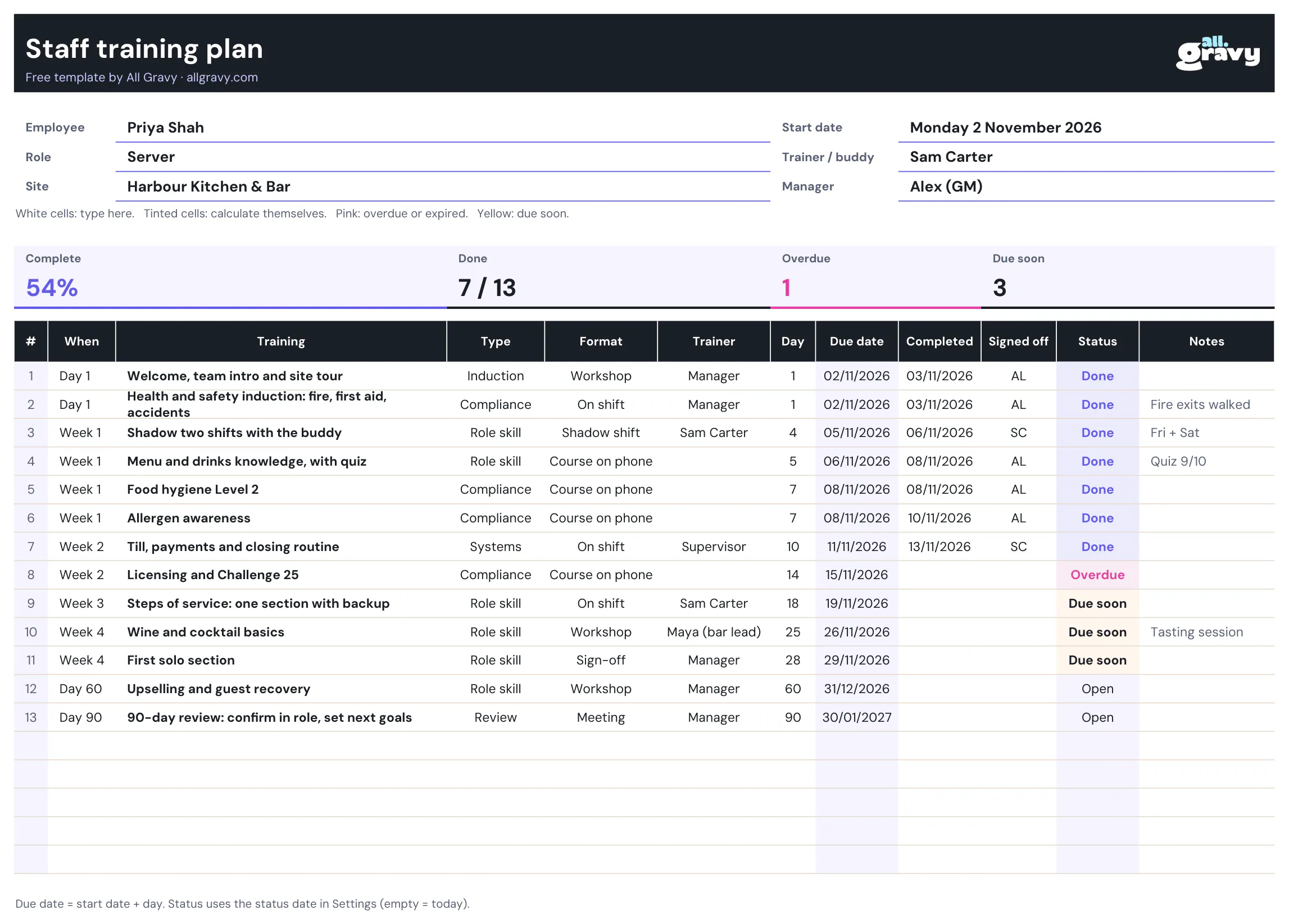
This free training plan template gives you a staff training plan in Excel that keeps itself up to date: type the start date and every due date fills itself, type a completed date and the status changes from Due soon to Done. A second tab holds a training matrix for the whole team, with refresh dates that turn yellow before training expires. There’s a printable PDF too.
What’s in the free training plan template
Built for hospitality, where most training happens on shift and new starters arrive every week.
- A training plan per new starter. Employee, role, site, start date, trainer and manager at the top.
- Due dates that fill themselves. Each item has a day (day 1, day 7, day 28). Add the start date and the due dates follow.
- Type and format drop-downs. Compliance, role skill, systems or review; course on the phone, on shift, shadow shift, workshop or sign-off.
- A trainer and a sign-off for every item. Who teaches it, and who confirms it’s done.
- Status that updates itself. Done, Overdue, Due soon or Open, coloured so the gaps stand out.
- Progress tiles. Percentage complete, items done, overdue and due soon, at the top of the plan.
- A team training matrix. Everyone in rows, every course in columns, with completion dates, refresh intervals and the share of the team that is up to date per course.
- A printable PDF. Plan and matrix on one landscape A4 page each, with the suggested training already filled in.
How to use the staff training plan
- Fill in the person. Name, role, site, start date, trainer and manager.
- Adjust the training list. The example is a restaurant server. Keep what fits, add what’s missing, delete the rest.
- Set the day for each item. Mandatory training before the first solo shift, role skills over the first weeks, a review at day 90.
- Name a trainer. Every on-shift item gets a person, not “the team”.
- Type the date when it’s done. Get the trainer or manager to initial Signed off. The status and tiles update themselves.
- Check the tiles once a week. Overdue items are the ones to sort before the weekend.
For the bigger picture, from formats to measuring results, read our guide to staff training in hospitality.
Keep the whole team on one page with the training matrix
The plan shows one person. The training matrix shows everyone: one row per team member, one column per course, and the date they completed it.
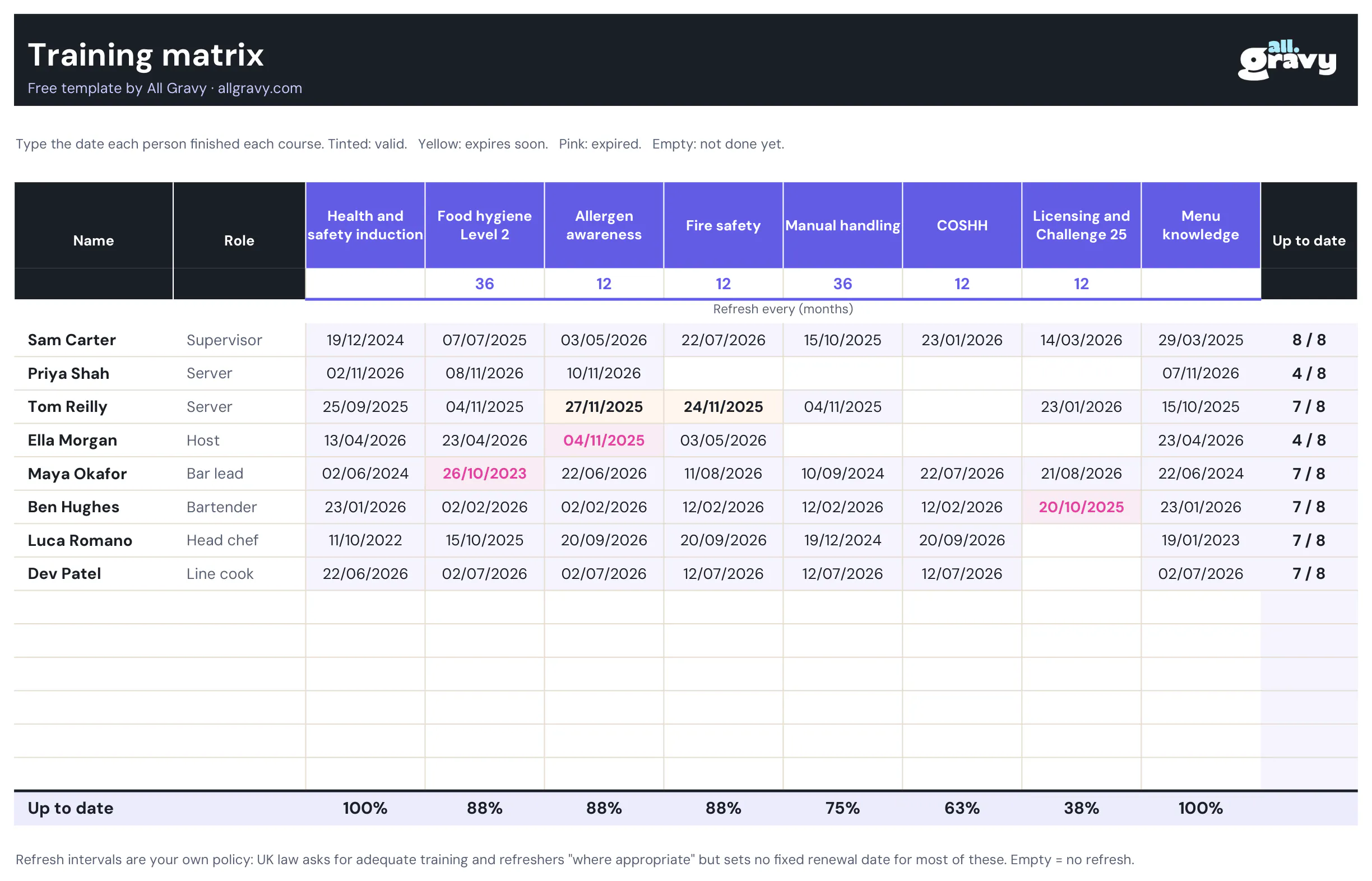
Set how often each course needs a refresh in months. A cell turns yellow before it expires and pink once it has. The column on the right counts how many courses each person is up to date on, and the bottom row shows the share of the team that is current per course: the number an area manager wants before an audit.
Set your refresh rules once
The Settings tab holds the due soon window (14 days by default) and an optional status date, so you can see the plan as it stood on a given day. The drop-down lists for types, formats and owners live there too: rename them to match how your business talks.
What a staff training plan should include
A plan that people actually follow answers six questions for every piece of training:
| Question | Column in the template |
|---|---|
| What is it? | Training |
| Must-have or skill? | Type |
| How is it learned? | Format |
| Who teaches it? | Trainer |
| By when? | Day and due date |
| How do we know it’s done? | Completed, signed off, status |
Mandatory training needs one more: when does it run out. UK law asks for health and safety training when people are recruited and when risks change, fire safety training when they are first employed, both repeated where appropriate. It rarely sets a fixed renewal date, so decide your own intervals and put them in the matrix. Our guide to compliance training covers what each course involves.
Tips for a training plan people stick to
- Mandatory first. Anything someone needs before working alone goes in week one, not “when it’s quiet”.
- Short lessons, practised soon. A lesson on the phone sticks when it’s practised on shift within a few days. See microlearning and blended learning.
- One plan per role, copied per person. Build the server plan once, then copy it for every new server.
- Review it at day 30 and day 90. Ask the new starter what was missing. Fix the plan for the next one.
- Pair it with the onboarding checklist. Our free onboarding checklist template covers the admin and the first days; the training plan covers the learning.
When the spreadsheet stops scaling at 5+ sites
A training plan in Excel works for one site and a manager who keeps it updated. At five sites it’s dozens of files, each as current as the last time someone typed into it, and the matrix for head office gets rebuilt by hand before every audit.
The All Gravy LMS does the same job without the typing:
- Courses for the right roles and sites, sent automatically to every new starter in that role.
- Learning on the phone, with short lessons and a quiz at the end, in the app the team already uses.
- Deadlines, reminders and refreshers, so expired training comes back on its own.
- Completion per course, site and person, with an export for audits.
To see it with your own training, book a demo.
Frequently asked questions
Is the training plan template really free?
Yes. Download the Excel file and the printable PDF straight from the page. No email, no sign-up. Use it for as many people and sites as you like.
Does the training plan template work in Google Sheets?
Yes. In Google Sheets go to File, Import and upload the .xlsx. The formulas, drop-downs and colours come with it. It also opens in Excel and LibreOffice.
What should a staff training plan include?
Who it is for and when they start, every piece of training for the role, the format (course, on shift, workshop), who trains it, a due date, the date it was completed, who signed it off, and a refresh date for training that expires.
What is the difference between a training plan and a training matrix?
A training plan is per person: what one new starter learns, in which order, by when. A training matrix is per team: everyone in rows, every course in columns, with the date each person completed it. The template has both.
How often should staff training be refreshed?
UK law asks for health, safety and fire training to be repeated where appropriate, without a fixed date for most courses. Set your own policy, for example yearly for allergens and fire safety, and enter it in the matrix so expiring training turns yellow.
Can I use the template for several sites?
Yes, with one copy per site or per person. Past a few sites the copies get hard to keep current, because completions happen in many places and nobody types them in. That’s where a learning platform pays off.