
 Scheduling
A Staff Holiday Planner That Sits Next to the Rota
A staff holiday planner inside the app your team already opens. Staff request holiday on their phone and see their balance, managers approve, and the rota shows who’s off while you plan the week.
350+ brands · 4,000+ locations
13 days left after this trip

What a staff holiday planner changes at every site
- 1 screenFor holiday and availabilityStaff mark the days that don’t work and request holiday from the same screen in the app.
- 1 appNot one more leave toolHoliday sits next to shifts, chat, training and handbooks. Nothing extra to roll out.
- 2 clicksTo cover a sick shiftMark a shift as sick, find cover from the same screen, and the hours are right for payroll.
Leave management software for whoever builds the rota
Every request lands where the rota gets built. Approve it, see the gap, fill it, without a spreadsheet in between.
-
01Approve
Every request, with the balance next to it
Staff pick the dates in the app and see what they have left before they send it. You get the request, the dates and the balance in one place, and approve it.
- Requests come from the app, not a text to the GM
- Staff see their balance before they ask
- Holiday and availability on one screen
Holiday request Priya S. · Sous Chef Brixton ✓Mon 14 - Fri 18 Jul · 5 days✓18 days left before this request…Waiting for your approval ApproveDecline -
02Plan
See who’s off while you build the rota
Approved holiday shows up in the planner, so you plan around it instead of finding out on the day. Availability sits on the shift too.
- Holiday and availability visible while you plan
- Per department and per site
- Changes reach staff as a notification
Rota · Brixton Week 29 Kitchen !Priya S. on holiday, Mon - Fri!Tom K. unavailable on Saturday✓Cover planned for both Publish week -
03Templates
Templates that know who’s on holiday
Apply your standard week with one click. Conflicts with holidays and double bookings are flagged before anything lands on the rota.
- Build the standard week once
- Holiday conflicts flagged before you apply
- Double bookings caught too
Template Weekday standard Brixton · Week 29 ✓16 shifts ready to apply!1 conflict: Priya S. is on holiday✓No double bookings Apply template -
04Fill the gaps
Ask the AI Assistant to fill the shifts
Tell the AI Assistant which shifts to fill. It finds people who can work them, around approved holiday, and nothing is published until you approve.
- Works around approved holiday
- Nothing goes out without your OK
AI Assistant Fill Brixton, week 29 ✓5 open shifts found✓Holiday taken into account…Ready for your OK Approve
An annual leave tracker in every pocket
-
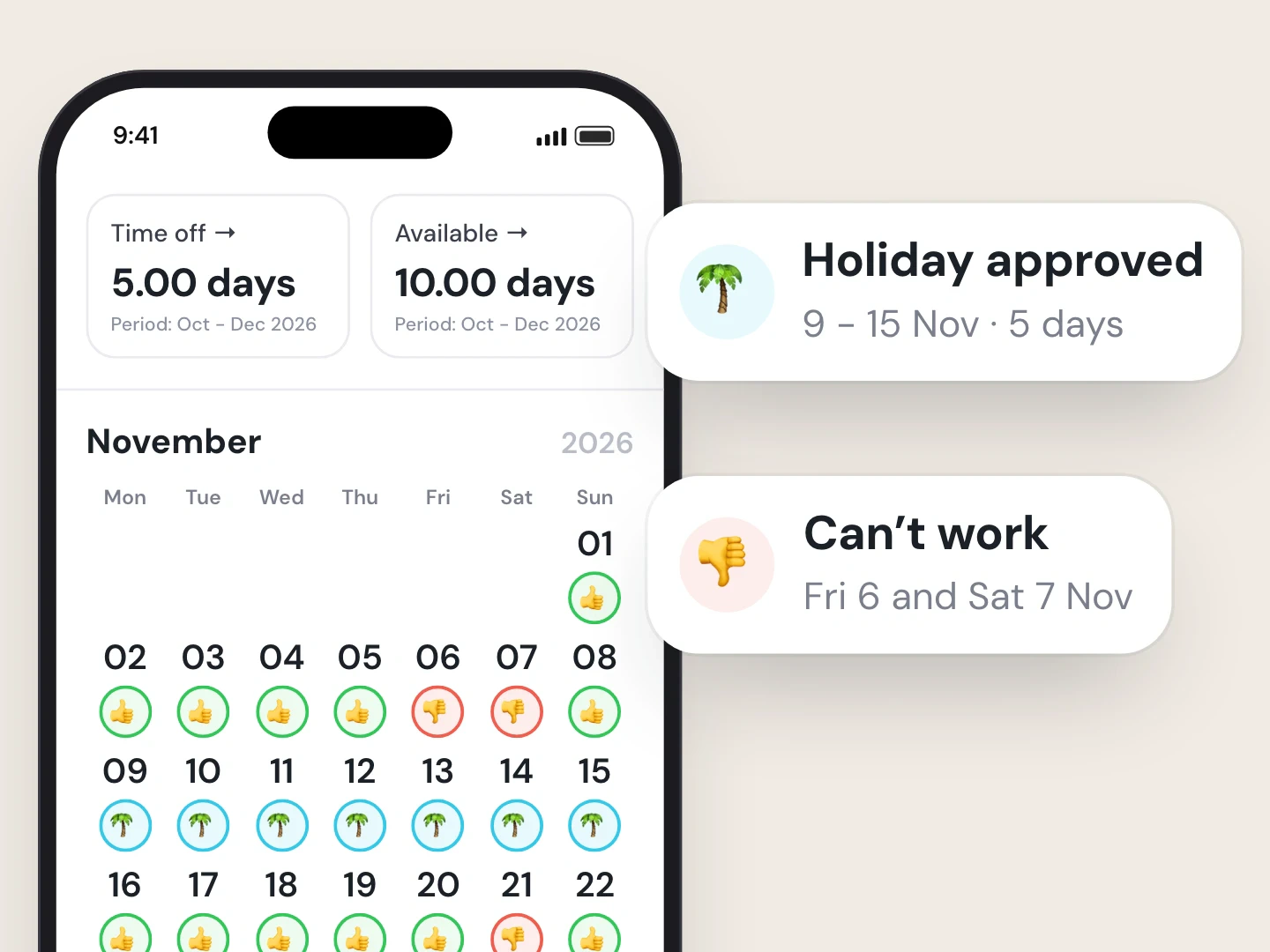
Holiday and availability, one calendar
Staff book holiday and mark the days that don’t work on the same screen.
- Rota · Brixton Fri 18 Jul Kitchen !08:00 - 16:00 · Priya S. on holiday✓09:00 - 17:00 · Tom K.→10:00 - 18:00 · open shift
Holiday shows on the shift
Holiday sits right on the shift in the planner, so a clash is hard to miss.
- Sick cover Sat 08:00 - 16:00 · Bar Brixton !Jamie R. marked as sick→Find cover from this screen✓Hours right for payroll
Sick cover in two clicks
Mark a shift as sick and find cover from the same screen.

- Requests and balances in the app
- Holiday visible while you plan
- Conflicts flagged on templates
More absence management, built into Scheduling
Time off and holiday requests
Staff request holiday in the app and see their balance. Managers approve, and the planner shows who is off while you build the rota.
Availability
Staff mark the days that do not work, and managers see it on the shift while they plan.
Sick cover in two clicks
Mark a shift as sick, find cover from the same screen, and the hours are right for payroll.
Rota templates
Build your standard week once and apply it with one click. Conflicts with holidays and double bookings are flagged before anything lands.
Rules-checked rotas
Rotas are checked against working-time rules while you plan, so a breach shows up before you publish.
Ask the AI Assistant to fill shifts
Tell the AI Assistant which shifts to fill. It finds people who can work them, and nothing is published until you approve.
How it works
- 1
Switch on Scheduling
The holiday planner is part of Scheduling, in the app your team already uses.
- 2
Staff request holiday
From their phone, with their balance in view.
- 3
Managers approve
The request, the dates and the balance in one place.
- 4
Plan around it
Approved holiday shows on the rota while you build the week.

Who it’s for
Head of People
One holiday process for every site, not one per GM.
HR Manager
Requests and balances in one place, not in texts and spreadsheets.
Area Manager
See who’s off at each site while the rota gets built.
Growing Multi-Site Owner
A holiday process that still works at site ten.
Staff holiday planner questions, answered
What is a staff holiday planner?
A tool where staff request holiday, managers approve it and everyone can see who’s off. In All Gravy it sits inside Scheduling, next to the rota, so approved holiday shows up while you plan the week. Running a single site on a spreadsheet? Start with our free staff holiday planner template.
Can staff see their annual leave balance?
Yes. Staff see their holiday balance in the app before they send a request.
How do managers approve holiday requests?
Requests come in from the app with the dates and the staff member’s balance. A manager approves them, and approved holiday shows on the rota.
Can it stop me rostering someone who’s on holiday?
It makes it hard to miss. Approved holiday shows in the planner while you build the week, rota templates flag conflicts with holidays before anything lands, and the AI Assistant works around holiday when it fills shifts.
Does it handle sickness absence too?
Yes. Mark a shift as sick, find cover from the same screen, and the hours are right for payroll. More on the people side in our guide to managing leave and absence, and our free Bradford Factor calculator for spotting short, frequent absences.
What does the holiday planner cost?
It’s part of Scheduling, an add-on to All Gravy. See pricing.

Know who’s off before the rota goes out.
Book a demo and see holiday requests, balances and approvals inside your own app.
- 350+ hospitality brands
- 4,000+ locations
- 4.7 on G2
