AI-powered

Scheduling

Making a schedule shouldn't feel like the early 2000's.
Trusted by

Two ways to run this

Run your rota inside All Gravy, or keep the rota system you already have and let the shifts flow into the app your team opens every day. Either way your people only have one app to learn.

Run your rota in All Gravy

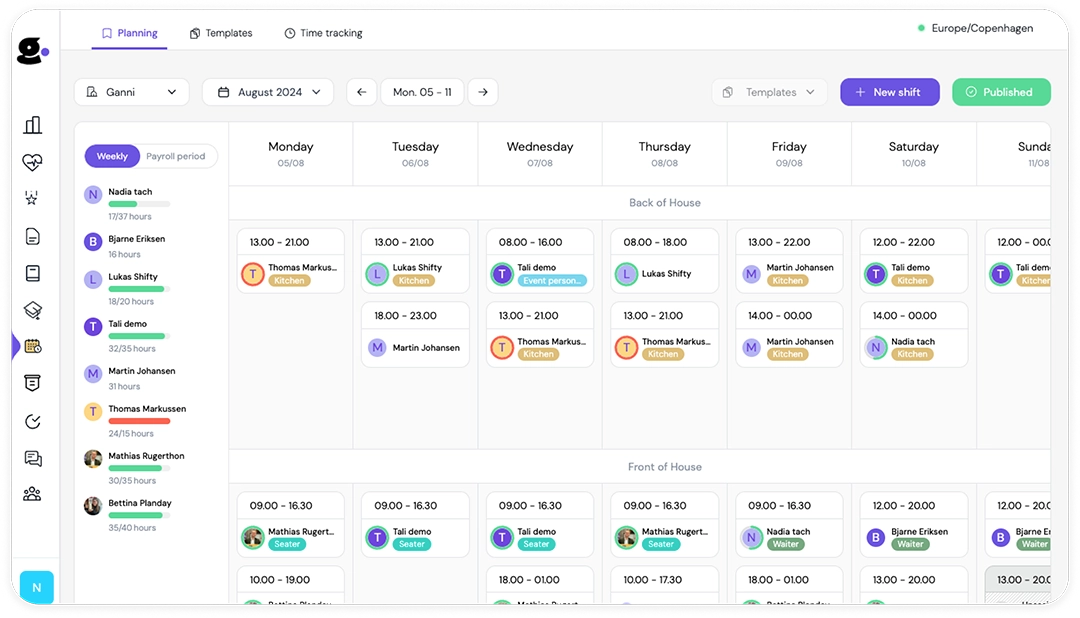
Planning, templates, availability, time off, time tracking and payroll export. Built for operators running multiple sites off one set of contracts.

Keep the rota system you have

Connect Fourth, Harri, Planday, Rotaready, S4Labour, Deputy, RotaCloud, Sona, Kobas, Opsyte and more. Shifts sync across and your staff see them where they already are.

Easy shift overview

Your work schedule
at a glance

Every shift and every hour, in the app your team already opens for chat, training and handbooks. No second login, nothing extra to roll out.

Stay informed with real-time shift updates

Publish a change and everyone affected gets a notification. No group chat, no guesswork.

The week, the shift, and the pay

Open a shift to see who else is on, what is expected, and what it pays.

Get the details right

All you need to know for a great shift

See who you are on with, what the shift pays, and what the shift needs. Plans changed? Offer it to a colleague as a swap, or put it up for grabs.

All the info you need, instantly available

Everything needed for the shift, in one place, before anyone turns up asking.

Easily swap
or sell your shift

Offer a shift to an eligible colleague or put it up for grabs. The approval flow you set decides who signs it off, and every step is logged.

Coverage without the ring-round

Request extra shifts directly in the overview

Publish a shift without a name on it and let people claim it. Staff request open shifts with a comment, so you stop calling round on a Friday night.

Get more shifts
with just a tap

Open shifts show up in the app. One tap to request, with a comment if there is something the manager should know.

Fill open shifts
without the hassle

Staff claim open shifts themselves, so filling a gap stops being six phone calls and a group chat.

Clock in from the app

Clock-in & out made easy - just show up

Open the app when you get in, tap once, and you are on the clock. Tap again when the shift ends. That is it.

No paper timesheets

Clocked hours land against the planned shift, ready for a manager to review.

Approved before it reaches payroll

Nothing goes into the payroll file until a manager has checked and approved it.

Availability and time off together

Set your availability and avoid awkward misunderstandings

Mark the days that do not work, add a note, and request holiday from the same screen. Your manager sees it while they are building the rota, not after it is published.

Your schedule, your way

Set availability in advance and your manager plans around it. Fewer mix-ups, fewer last-minute scrambles.

The manager side

Planning, templates, time tracking and payroll export, built for operators running a lot of sites and a lot of contracts.

See what the rota costs while you build it

Every shift you add updates the cost of labour and your payroll percentage. Put in the day's expected revenue and you can tell whether the week you just built is affordable before a single notification goes out.

Cost per day, per department, per site

Group headers roll up cost and a weighted payroll percentage, so you can see which department is carrying the week.

Draft shifts count

The number moves on drafts, not just published shifts. You catch the problem before you commit to it.

Salaried and hourly in one figure

Monthly salary is spread across the period, including mid-month starters and unpaid leave, so the total is the real total.

Hours against contract

Ensure your people
get their hours

See planned hours against contracted hours while you build the week, so you can spread shifts fairly and catch the gaps before payroll does.

Spot who is short on hours

See who is under their contracted hours and who is over, so you can even it out before the week goes live.

Accurate Time Tracking

Worked hours sit next to planned hours across every site, so the numbers you approve are the numbers that actually happened.

Stop rebuilding the same week

Create templates that can be applied with a single click

Build your standard week once, then apply it. Adjust the exceptions instead of rebuilding the whole thing from scratch every Sunday.

Time-Saving Templates

Eliminate repetitive tasks by creating reusable templates for your schedules.

Consistent Scheduling

Standardise the way you roster so every week starts from the same base, accurate and conflict-free.

Stop building schedules you cannot legally run

Set your rules once for each region and the planner flags a breach the moment you create it, not when someone complains. Start from a rule template rather than writing your own from scratch.

Rest and hours

Minimum rest between shifts, maximum hours in a period, and maximum days without a rest day.

Weekends and young workers

Free weekends per period, and age restrictions so under-18 staff are never rostered into a shift they should not be in.

Payroll without the spreadsheet

Review, Approve & Export to payroll. Easy as that

Review the hours, make the adjustments, approve, export. Every export comes with an audit companion PDF and a log of what changed and who changed it.

Effortless Time Approval

Quickly review and approve employee hours with just a few clicks. Our intuitive interface allows you to make adjustments on the spot, ensuring everything is accurate before exporting to payroll.

An export built for payroll

Approved hours export as a CSV with pay, including loenart codes for Danish payroll. Contracts carry a salary ID so the file lines up on the other side.

Give your employees the best start

Questions operators actually ask

Do we have to replace our current rota system?

No. All Gravy connects to a long list of workforce systems including Fourth, Harri, Planday, Rotaready, S4Labour, Deputy, RotaCloud and Sona. Shifts sync in and your staff see them in the app. You can move scheduling over later if you want to.

Can we run scheduling entirely in All Gravy?

Yes. Planning, templates, availability, time off, time tracking and payroll export are all native.

Does it handle salaried and hourly staff together?

Yes, including people who start partway through a month. Monthly salary is prorated rather than rounded.

Can employees swap shifts without a manager approving?

Your call. Set an approval flow and swaps route to the right approver. Leave it off and eligible swaps go through on their own. Either way there is an audit log of every step.

Is time tracking included or is it a separate module?

Included. Staff clock in and out from the app and the hours land against the planned shift for a manager to approve.

How many locations does this work across?

It is built multi-site. Operators usually come to us at five or more sites, when the setup that worked at three stops holding.

Set up a call to learn more

On the call, you'll talk with one of our product experts, and together you'll go over the following:

  • Understanding of your situation to see how we can help
  • Demonstrating the relevant parts of the All Gravy app to help your situation

Fill out the contact form on this page, and we'll get back to you and set up a date and time that fits your schedule.

Book a demo here